
Then I discovered Scrivener. It took a few courses and a few tries but this program became my lifesaver. All those bits and pieces of information are now right at my fingertips without leaving the program. Here's a screen capture of my most recent project - the third in a new series of books that will come out in 2015.

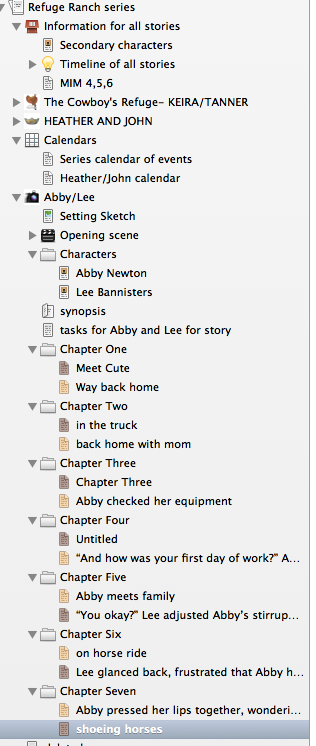
I have a closer view, in the picture below of the left side of the screen. All along this part of the program are all the chapters from my current book listed in order. Above those, are all the other books in the series, collapsed down. If I want to access them I just have to click the triangle beside it and they all show up like the manuscript I have now. Right now I'm on the second scene in Chapter Seven of the third book, it's highlighted in grey. I can get to any of the other scenes with a click of the mouse.

On the opposite side of the manuscript, the yellow side I can make notes to myself for each scene that don't go into the manuscript. I can set up different colours for different points of view, I can access my research, my character sketches complete with photographs, my synopsis, the timeline for all the books or for this particular book all within Scrivener. I can make a snapshot of my work and, if I make a lot of changes and want to revert back to what I had, all I have to do is find the snapshot I made and all the work is right there, just as it was. I can add pictures of my characters and get a meter showing that tells me how far I am on my goal for the day and my total manuscript goal. I can do a word search for frequently used words. (my characters sigh a lot, and frown apparently) And I can open a window that will give me name suggestions for my characters.
All this is only scratching the surface of what this program can do. Scrivenr has saved my bacon many a time with this new series. I love it and can't say enough good about it. And you don't need to use it just for writing novels. It also works well for papers and any type of writing that requires access to multiple files. When I'm done, I choose which documents I want to export, hit compile and all my files are now exported to a Word Document for me to finish editing and send off to my editor.
So if you'e the disorganized type, you might want to give it a try. There are numerous courses out there for Scrivener. The one I took was from Gwen Hernandez - here's a link to her next course - http://gwenhernandez.com/scrivener-corner/scrivener-training/scrivener-online-classes/
Here's where you can buy it: http://www.literatureandlatte.com/scrivener.php
I get nothing for doing this. And neither do the Craftie Ladies. I just want to share my enthusiasm for a program that has made such a difference for me in my writing. Has taken away a lot of frustration and saved me acres of time in terms of hunting for stuff that I Knew I Had Somewhere. You can try it for free or you can buy it and dive in. Either way, consider it. You'll be glad you did.
And now, I have to go look for a phone bill so I can finish ...... um.....what was I doing again?


 Posts
Posts


